Faxing. Magical - Delightful - Easy

Faxing has never been this easy. Faxes show up on your screen with the sender's name on them and a person in charge of each one. Sending is drag, click, done. Works with your Phone.com fax number today. On a different fax service? Tell us which and we'll set it up for you. Free.

Download free   See the two-minute tour

Windows 10 or 11 - one file to download, nothing to install

Free Fax Desk on Nick Launches

Not on Phone.com? Tell us what you use - help@freefaxdesk.com - and we will see what it takes to add it. Services with an API are first in line.

Free Fax Desk free Windows fax software: incoming fax inbox with sender names, assigned staff and Done buttons
The pile

Every office has one.

The fax that came in while everyone was busy, and sat.
The referral two people thought the other one had.
"Did that go out?" - and nothing to show for it.
The same number typed for the fifth time this week.
Documents living on somebody else's server.
Printed, scanned, printed again - and still nobody is sure it was handled.
There is a simpler way: give every fax a name, an owner and a receipt.
What changes

Named. Owned. Handled.

Name it once

Put a name on a fax number one time and every later fax from it shows the name. You always know who is faxing you.

Hand it to a person

Assign a fax with one click; it shows up as theirs. Set a rule so a regular sender always goes to the right desk. Nothing waits for "someone".

One-file proof

Every send produces one PDF: the transmission report and the cover page together. "Did you fax it?" is answered with one attachment.

Who made this

Built at a front desk that changes lives.

Free Fax Desk comes from Frye Chiropractic in Lancaster, California: a clinic that has been changing people's lives since 1994, one patient at a time, with a team of doctors who do work they are proud of. A clinic like that lives and dies by its front desk - and a front desk lives on fax: referrals, records, authorizations, every day.

We know exactly what a missing referral looks like at closing time. So we built FaxDesk for our own desk first, on the Phone.com line we already had. It runs our office every day. It is open source, so anyone can read what it does; it is built and signed in public; it costs nothing to try and nothing to keep. We are giving it away because every small office deserves the same desk.

"The fax panel Harry built for us is truly amazing; it saves my staff so much time. We can name the phone numbers, so we see who a fax came from. When a fax is opened we can assign it and it shows up for that person as theirs. Pair a regular sender with a staff member and you have a presort that saves time and energy."
The plan

Three steps. Ten minutes.

01

Download FaxDesk

One file, no installer, no admin rights. Double-click and it opens in your browser.

02

Paste your Phone.com key

Ten minutes, once. The guide walks through it.

03

Work the inbox

Name senders, hand faxes to people, send with one click. Proof lands in the log.

Download free

Two-minute tour

Magical - Delightful - Easy, in six screens.

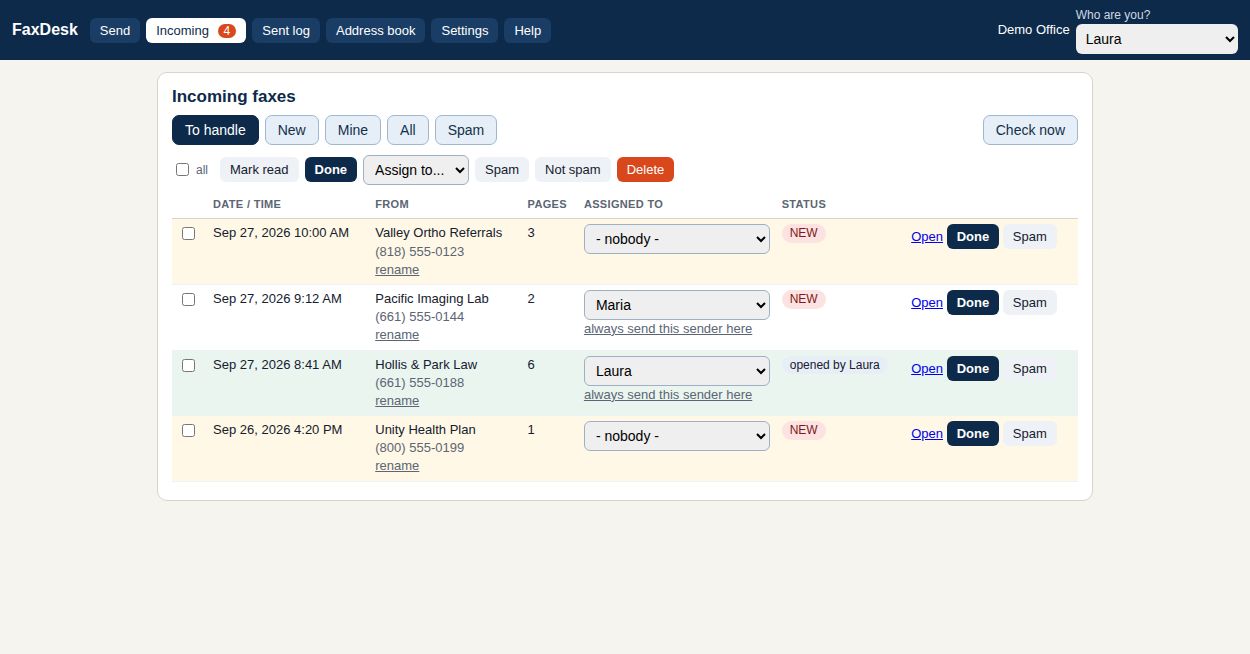
Free Fax Desk Windows fax software inbox: incoming faxes listed with date, pages and a new sender shown by number only
1. The inbox
A new fax is waiting: number only, nobody assigned.
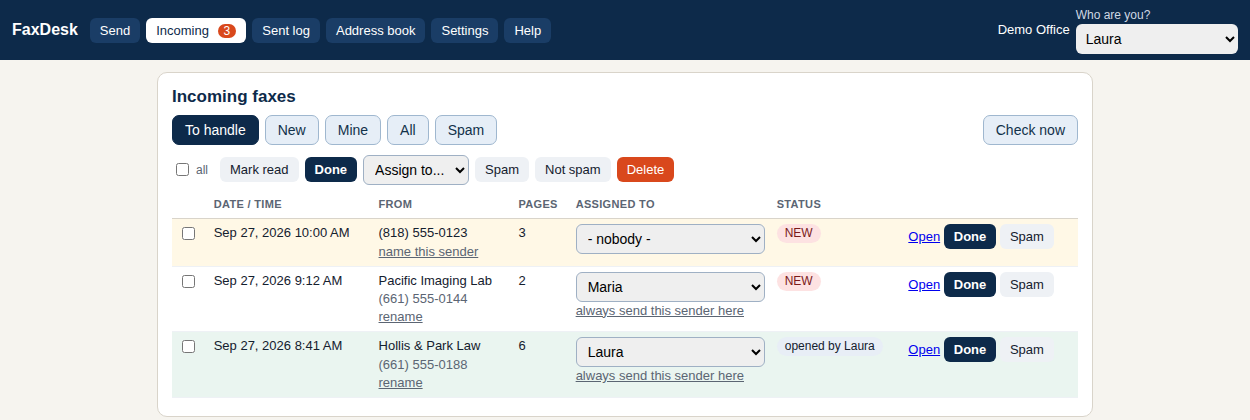
Free Fax Desk inbox after naming the fax sender once; every later fax from that number shows the name
2. Name the sender
Type the name once. Every future fax from that number arrives named.
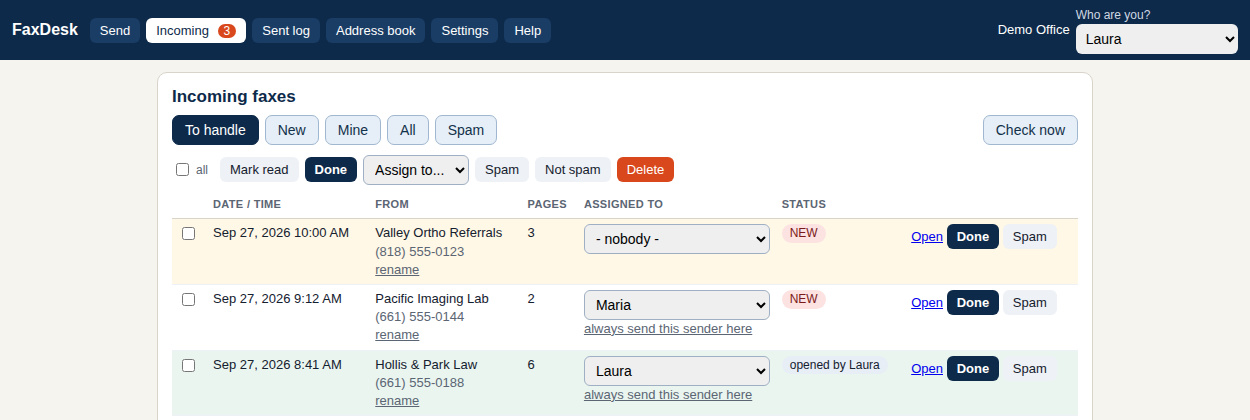
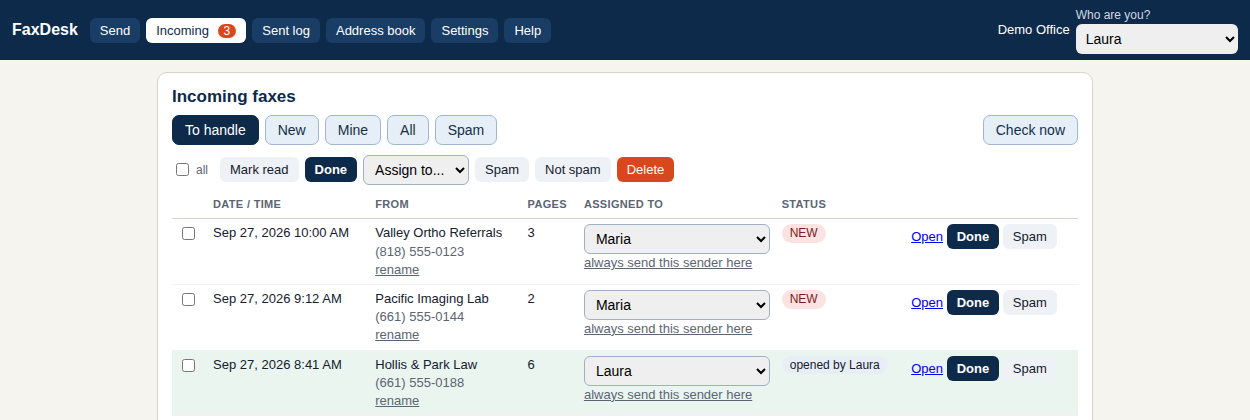
Free Fax Desk incoming fax assigned to a staff member, with the owner shown in the assigned-to column
3. Hand it to a person
Pick an owner. The row now says who has it; a rule can make it automatic.
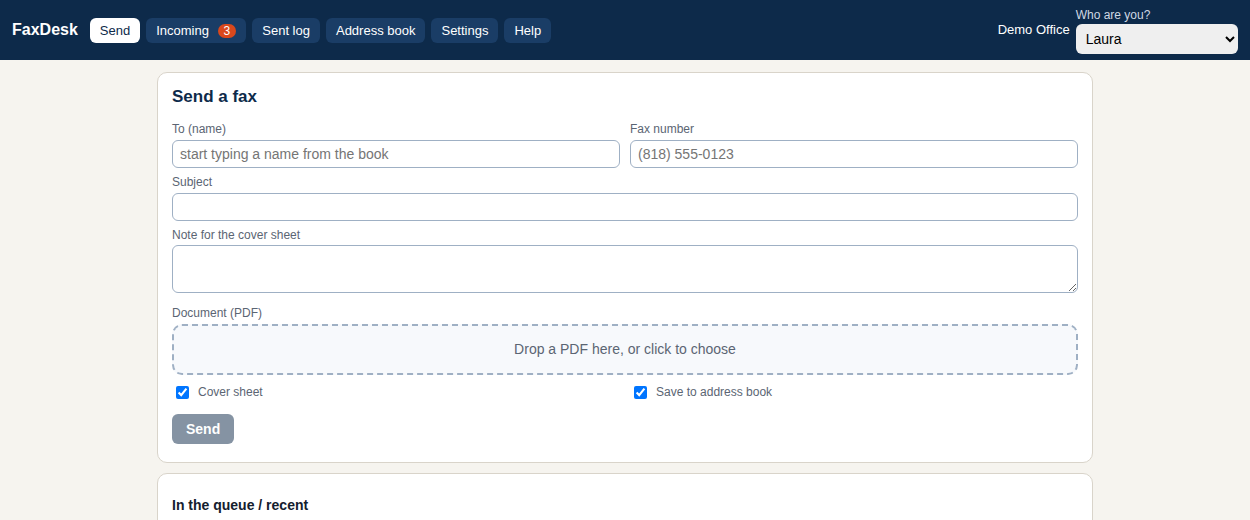
Free Fax Desk send-a-fax screen: recipient from the address book, PDF attached, automatic cover sheet
4. Send a fax
Type a name from the book, drop a PDF, press Send. The cover page is automatic.
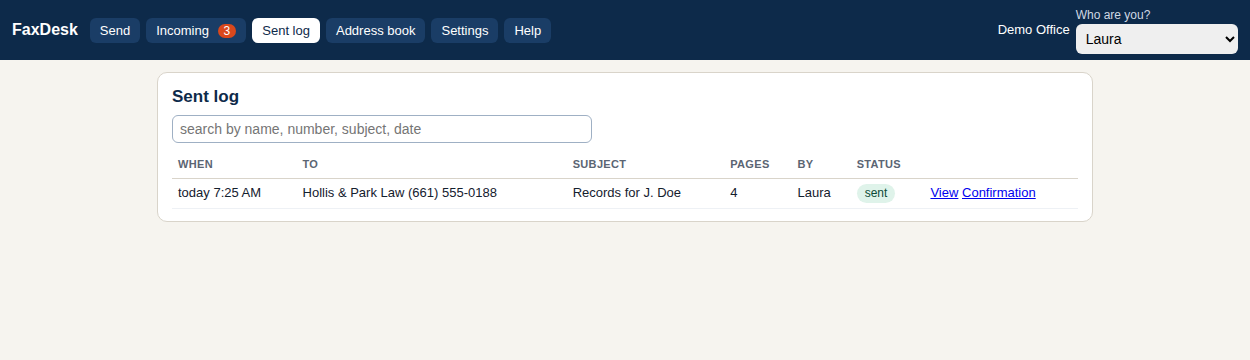
Free Fax Desk sent log with a confirmation PDF and transmission report for every fax sent
5. Proof in one PDF
The sent log keeps every fax; Confirmation opens the transmission report with the cover page.
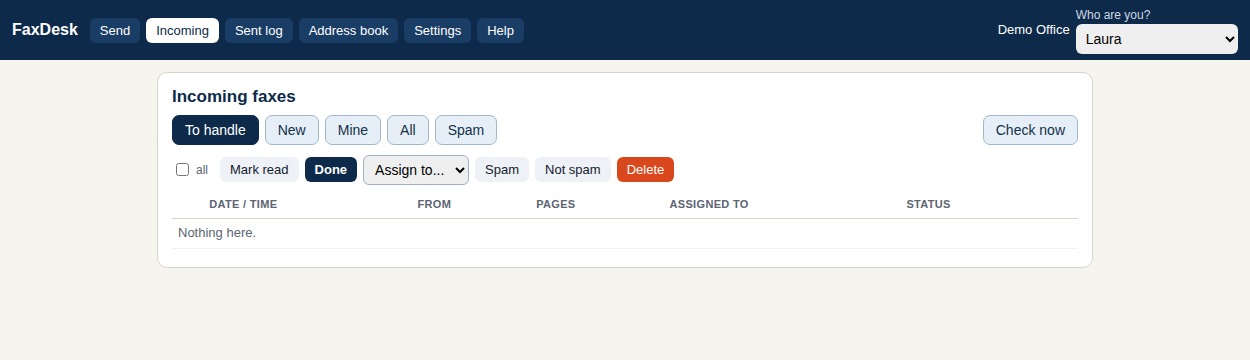
Free Fax Desk empty inbox: every incoming fax handled and marked done
6. An empty inbox
Nothing left to handle, and everyone can see that.
In plain words

What Free Fax Desk is

Free Fax Desk (the app is called FaxDesk) is a free Windows program that turns a Phone.com internet fax line into a working fax desk on your PC. Incoming faxes appear on screen with the date and time, the sender's name once you have named the number, who owns the fax and whether it has been handled. Junk senders can be blocked with one click and unblocked just as easily. Sending is a PDF, a number from the address book and a confirm; a cover page with your logo and your disclaimer goes on automatically, failed sends retry and tell you why in plain words, and every send produces a confirmation PDF with the transmission report and the cover page.

Nothing leaves your PC except the fax itself: no cloud account, nothing reporting back, no update checks. You set how many days to keep incoming and outgoing faxes, and a daily backup folder is kept on the same machine. It is a single EXE with no installer, published under the MIT licence by HnS, LLC, and it works with the Phone.com line you already pay for; on a different fax service? See the list or email us which one and we'll set it up for you.

Pricing

Free for one PC. Whole office when you need it.

Free

$0
  • Every feature, on one PC
  • No page limits, no time limit, no nag
  • Open source, MIT
Download free

Questions

Do I need a Phone.com account? Yes, today. FaxDesk started on Phone.com and that is the tested path; other services are coming, and you can ask for yours. If you do not have a line yet, phone.com gets you a fax number.

How do I get the API key? Ten minutes, once: Get your Phone.com API key walks through it with screenshots-free plain steps.

Is it really free? Yes. Every feature, no page limits, no time limit, no nag, on one PC. The only paid option is opening the same inbox to every desk on your office network: $99 one time per office.

Is it secure? Your token is stored sealed to your Windows account. Faxes are files on your PC. FaxDesk never sends anything anywhere except to Phone.com to fax it: no cloud account, no telemetry, no update checks.

Is it HIPAA compliant? No software is, by itself. FaxDesk keeps your faxes on your own PC and adds no third party; your Business Associate Agreement stays between you and Phone.com. Set the retention days to match your policy.

Does it work on a Mac? Not yet as an app. It is plain Python, so it runs on a Mac from source (FaxDesk.command in the download); a packaged Mac app comes when enough people ask.

Windows says "Windows protected your PC". That is SmartScreen reacting to a new, not-yet-signed download. Click "More info", then "Run anyway". Signed releases are on the way; see the code signing policy.

Can several people use it? On one PC, yes: pick your name and work. To use it from other desks you need the whole-office key, which turns on the office-network switch. Then every desk opens the same page in a browser; nothing to install on those PCs.

Will it delete faxes at Phone.com? No. FaxDesk only reads from Phone.com. What you delete in FaxDesk is deleted on your PC.

Who made this? Frye Chiropractic, a multi-doctor practice in Lancaster, California, built it for its own front desk on its Phone.com line and decided to give it away. It is published by HnS, LLC and the code is open on GitHub under the MIT licence.

Support? help@freefaxdesk.com. If FaxDesk saves you time, buy us a coffee.